Local AI: what LLMs can your Mac actually run?
There are plenty of leaderboards that answer which AI model is smartest? I wanted one that answered a more practical question:
Given the Mac I already own, what is the best model I can actually run?
That question gets surprisingly complicated. A model name alone is not enough. You also need to know which quantization you are downloading, how much unified memory it needs, whether the benchmark score belongs to that exact artifact, and whether your inference engine and coding harness can work with it.
So I built Local AI, an interactive map of model intelligence versus local model size.
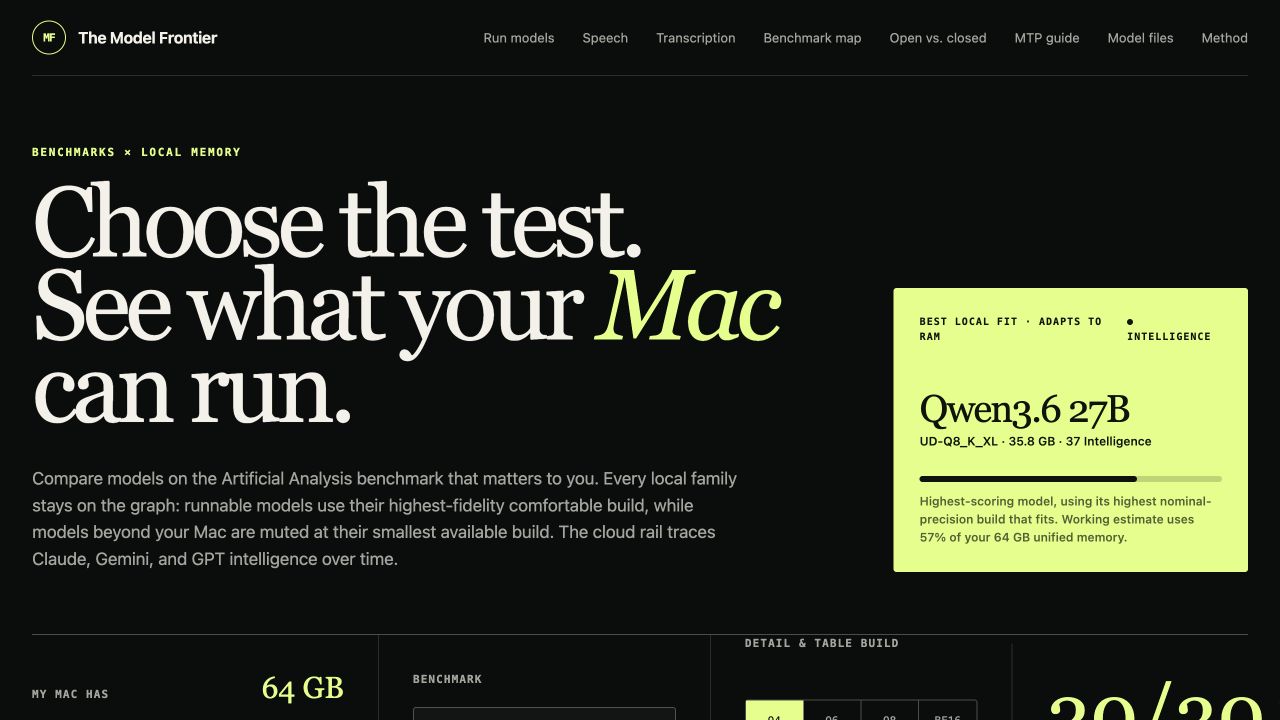
Plotting Model Intelligence vs. Model Size for Open and Closed Models
The main chart combines two views that are usually separated:
- How capable is the model? The benchmark selector uses data from Artificial Analysis and can switch among its Intelligence, Coding, Agentic, SciCode, Humanity’s Last Exam, GPQA Diamond, CritPt, and Long Context Reasoning evaluations.
- Can it run locally? The horizontal axis is the actual GGUF file size. A RAM control moves the Mac comfort line and recalculates which model families fit.
The default is a 64 GB Mac. I reserve 20% of unified memory for macOS and inference overhead rather than pretending the entire machine can be occupied by model weights. Models that fit stay bright; everything else remains on the chart in gray. I wanted the graph to preserve history and context instead of making models disappear when the RAM setting changes.
For each model family, the graph selects the highest-precision build that fits comfortably. If none fit, it shows the smallest available build so you can see how far away it is.
Open Models are on the left side of the plot. Closed Models are on the right side of the plot. On a given horizontal line, you can visually see what level of intelligence a given open model has compared to a closed model. For example, Qwen 3.7 27B released in April 2026 has an intelligence index of 37. This is close to GPT 5.1 which was released Nov 13, 2025. It’s amazing we can now run a GPT 5.1 level model locally!
Looking at all of the models from GPT 3.5 Turbo to Claude 3.7 Sonnet to now Claude Fable 5 is a walk down model memory lane.
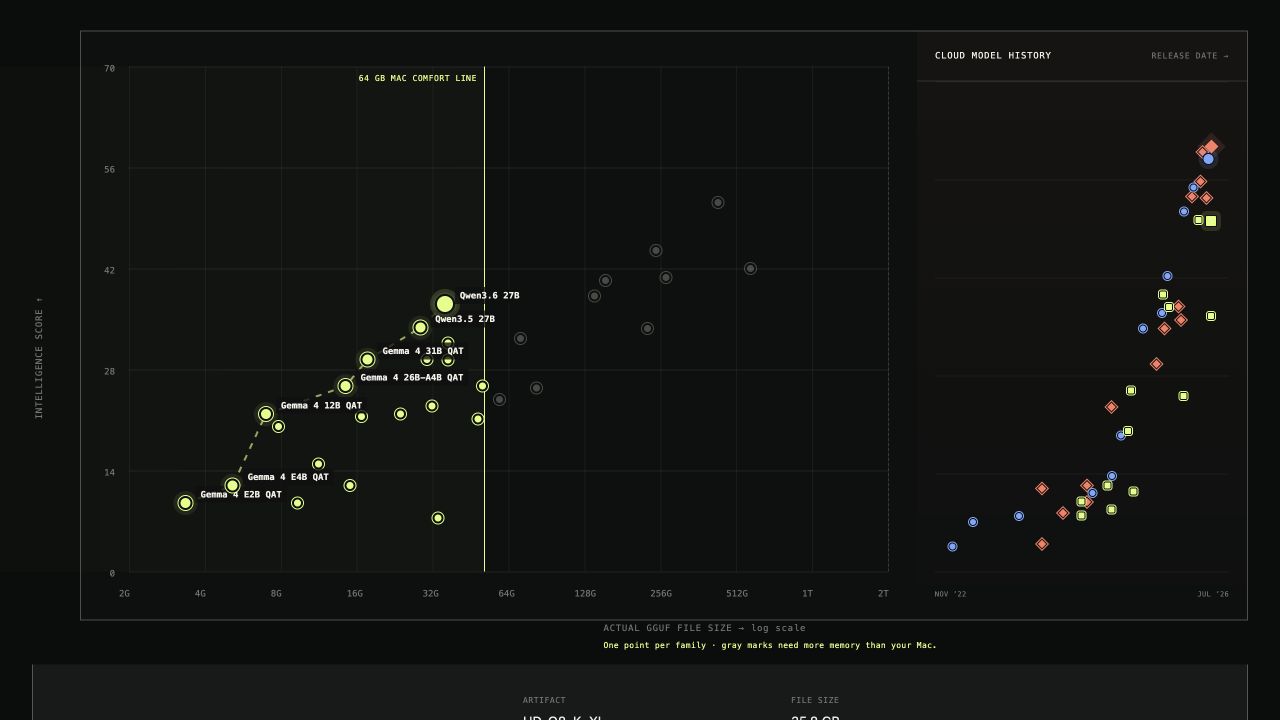
That produces something closer to a shopping guide than a leaderboard. The Pareto frontier shows models that improve capability without requiring a larger file than an already-better option. Changing the benchmark can redraw that frontier: the best small coding model may not be the best small reasoning model.
Quantization is part of the product
Open models are not a single download. The same weights may be available as Q2, Q3, Q4, Q5, Q6, Q8, BF16, importance-aware quants, dynamic quants, and model-specific formats.
The site keeps the main graph readable by plotting one artifact per model family, but the model detail view exposes the actual files. It shows:
- the GGUF size;
- whether it fits the selected Mac;
- the quantization recipe;
- the Hugging Face repository;
- repository likes and recent downloads; and
- a copyable
hf downloadcommand.
I added Google’s Gemma 4 quantization-aware training checkpoints. QAT simulates quantization during training instead of compressing the model only after training. Google says this retains more quality than a standard post-training quantization baseline.
This distinction matters. Quantization can preserve most of a model’s quality, but a benchmark score for the BF16 or hosted model is not automatically a measured score for every quant. One thing I may try to do is benchmark these quants.
Multi-token prediction changes the speed axis
Model size and intelligence are only two parts of local inference. Speed matters too.
Qwen3.6 has Multi-Token Prediction (MTP) variants with extra prediction heads. Instead of proposing one token per model pass, the MTP heads can draft several future tokens and let the full model verify them together. When enough drafts are accepted, generation advances by multiple tokens at once.
Unsloth reports roughly 1.4–2.2× speedups depending on the model and settings. The site compares standard and MTP repositories at matching quantizations, shows the extra file and memory cost, and links to the runtime caveats.
I do not add the reported speedup to the intelligence score. MTP changes the decoding path, not the model’s benchmark capability. It is better represented as a separate property of a runnable artifact.
Open weights are closing the gap—but by how much?
I also wanted to see model progress over time rather than only today’s ranking.
The frontier-gap chart tracks the best available proprietary and open-weight model after each major release. It shows both the score difference and a time difference: how long it took the other side to reach a comparable intelligence level.
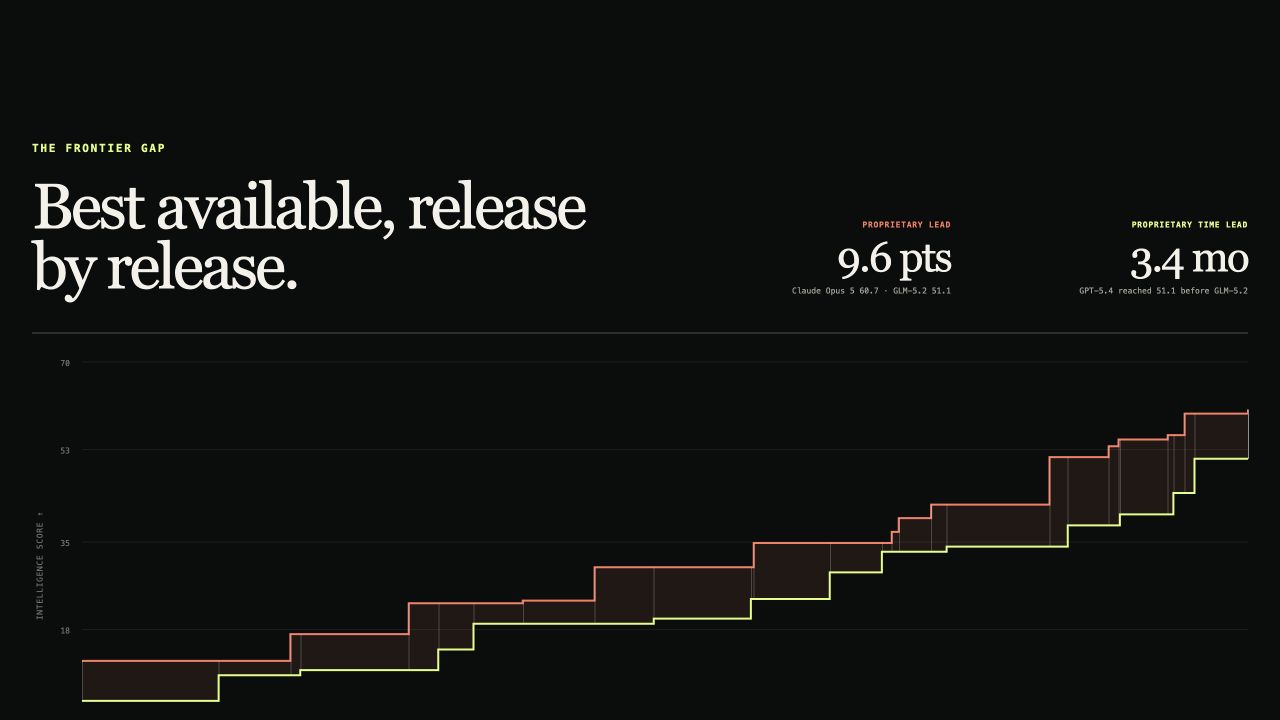
In the current snapshot, the proprietary frontier leads by 9.6 Intelligence Index points and reached the comparable threshold about 3.4 months earlier. Those numbers will change quickly, which is why the chart is release-based and keeps older Claude, Gemini, GPT, DeepSeek, Qwen, and other model generations.
The changelog below the graph makes the line easier to audit. Each row records the release that moved either frontier instead of drawing a smooth trend through dates when nothing changed.
What I want this to become
The goal is not to declare one universal winner. It is to make the tradeoffs legible:
- How much intelligence do I gain for the next 8 or 16 GB of RAM?
- Does a Q4 build preserve enough quality for my use case?
- Is a smaller dense model better than a larger mixture-of-experts model on my benchmark?
- Does MTP make a model fast enough to use interactively?
- Which engine and harness combination has the least friction?
- How far behind the proprietary frontier is the best model I can actually keep on my own machine?
Local AI comparisons need to connect benchmark results to real artifacts and real hardware. “This is a 31B model” is not enough information. I want the model map to get all the way from a point on a benchmark chart to a file that fits your Mac and a command that lets you use it.
That is the useful frontier for me: not just what the smartest model can do, but what the smartest model I can run locally can do.
If you’re interested in seeing how to run local models with a coding agent harness, Vicki Boykis’ post is a good one.